Course description

Building Side-by-Side Extensions on SAP BTP is a comprehensive enterprise training program designed for SAP BTP developers, SAP CAP developers, SAP Fiori developers, SAP Business Application Studio developers, full-stack developers, cloud application developers, SAP technical consultants, solution architects, and implementation partners who want to build scalable, cloud-native side-by-side extensions using SAP Business Technology Platform (SAP BTP).

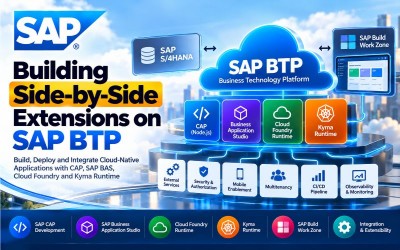
This course provides practical knowledge of SAP Cloud Application Programming Model (CAP), Node.js, SAP Fiori Elements, SAP Business Application Studio, SAP Build Work Zone, Cloud Foundry Runtime, Kyma Runtime, Kubernetes, SAP BTP Services, External Service Integration, Security, Multitenancy, Continuous Integration & Continuous Delivery (CI/CD), Observability, and Cloud-Native Application Development.

Following SAP's official Learning Journey, the course progresses from CAP development fundamentals through SAP Business Application Studio, Cloud Foundry Runtime, Kyma Runtime, Kubernetes, cloud deployment, monitoring, and enterprise-grade side-by-side extension development.

Modern enterprises require cloud-native applications that extend SAP solutions without modifying the SAP core. Side-by-Side Extensions on SAP Business Technology Platform (SAP BTP) provide a secure, scalable, and upgrade-safe approach for extending SAP S/4HANA and other SAP applications while maintaining a Clean Core architecture.

This course introduces the complete lifecycle of developing side-by-side extensions using SAP Cloud Application Programming Model (CAP) with Node.js, integrating SAP Fiori Elements, consuming external services, implementing security and authorization, deploying applications to Cloud Foundry Runtime, integrating applications into SAP Build Work Zone, and developing cloud-native applications using Kyma Runtime and Kubernetes.

Throughout the course, learners will gain practical implementation experience by building enterprise-ready cloud applications, integrating SAP and non-SAP systems, deploying applications using CI/CD pipelines, implementing multitenancy, monitoring cloud workloads, and applying SAP development best practices.

By the end of this course, participants will possess the knowledge required to design, develop, deploy, secure, monitor, and maintain enterprise-grade side-by-side extensions on SAP BTP.

Who Should Attend

  • SAP BTP Developers
  • SAP CAP Developers
  • SAP Fiori Developers
  • SAP Full Stack Developers
  • SAP Technical Consultants
  • SAP Solution Architects
  • SAP Integration Developers
  • Cloud Application Developers
  • Node.js Developers
  • Kubernetes Developers
  • SAP Business Application Studio Developers
  • DevOps Engineers
  • Enterprise Software Engineers
  • Cloud Architects
  • SAP Implementation Consultants

Skills You Will Gain

  • SAP Business Technology Platform (SAP BTP)
  • Side-by-Side Extensions
  • SAP Cloud Application Programming Model (CAP)
  • Node.js Development
  • SAP Fiori Elements
  • SAP Business Application Studio
  • SAP Build Work Zone
  • Cloud Foundry Runtime
  • Kyma Runtime
  • Kubernetes
  • External Service Integration
  • Security & Authorization
  • Multitenancy
  • CI/CD Pipelines
  • Observability & Monitoring
  • Cloud-Native Development

Career Opportunities

  • SAP BTP Developer
  • SAP CAP Developer
  • SAP Cloud Developer
  • SAP Technical Consultant
  • SAP Extension Developer
  • SAP Full Stack Developer
  • Cloud-Native Application Developer
  • SAP Integration Developer
  • SAP Solution Architect
  • DevOps Engineer
  • Kubernetes Developer
  • SAP Platform Engineer
  • Enterprise Cloud Developer
  • SAP Software Engineer
  • Digital Transformation Consultant

These roles are highly demanded across consulting firms, manufacturing, retail, banking, healthcare, telecommunications, logistics, utilities, public sector, and enterprises implementing SAP Business Technology Platform and SAP S/4HANA.

Certification Preparation

This course is designed to support learners preparing for SAP Business Technology Platform (SAP BTP), SAP CAP, and SAP Extension Suite certifications by covering the concepts included in SAP's official Learning Journey.

Participants will gain practical knowledge in:

  • SAP Cloud Application Programming Model (CAP)
  • Node.js Development
  • SAP Fiori Elements
  • SAP Business Application Studio
  • SAP Build Work Zone
  • Cloud Foundry Runtime
  • Kyma Runtime
  • Kubernetes
  • Security & Authorization
  • External Service Integration
  • Observability
  • Cloud-Native Development

The course combines conceptual learning with practical implementation exercises to prepare learners for enterprise SAP BTP extension projects and certification success.

What will i learn?

  • Understand side-by-side extension architecture.
  • Build applications using SAP CAP.
  • Develop Node.js cloud applications.
  • Create SAP Fiori Elements user interfaces.
  • Consume external services.
  • Implement authorization and security.
  • Deploy applications to Cloud Foundry.
  • Develop applications using Kyma Runtime.
  • Configure Kubernetes workloads.
  • Build enterprise cloud-native applications.

Requirements

  • Basic JavaScript or Node.js knowledge
  • Basic SAP development concepts
  • Understanding of web application development
  • Familiarity with REST APIs and cloud computing
  • Basic database concepts
  • Computer or Laptop
  • Stable Internet Connection
  • Modern Web Browser
  • SAP BTP Trial or Enterprise Account
  • SAP Business Application Studio (Recommended)

Frequently asked question

Yes. The course starts with SAP Cloud Application Programming Model (CAP) fundamentals before progressing to cloud-native application development, Cloud Foundry, Kyma Runtime, Kubernetes, and enterprise deployment.

No. Basic programming knowledge is helpful, but the course introduces SAP BTP development concepts from the fundamentals.

Yes. The course covers building Node.js-based applications using the SAP Cloud Application Programming Model (CAP), including SAP Fiori Elements, custom business logic, external services, security, deployment, and SAP Build Work Zone integration.

Yes. You will learn to develop cloud applications using SAP Business Application Studio, integrated productivity tools, mobile development capabilities, multitenancy, and CI/CD pipelines.

Yes. The course explains application development, deployment strategies, networking, routing, observability, monitoring, scaling, security, resilience, and AI integration using SAP BTP Cloud Foundry Runtime.

Yes. You will learn Kubernetes fundamentals, Kyma Runtime, workloads, services, eventing, storage, observability, SAP BTP Service Management, ConfigMaps, and Secrets for cloud-native SAP application development.

Yes. The course includes deploying CAP applications and integrating them into SAP Build Work Zone, Standard Edition, enabling enterprise users to access cloud applications through a unified digital workspace.

You will gain hands-on experience building SAP CAP applications, creating SAP Fiori Elements interfaces, consuming external services, implementing security, deploying applications to Cloud Foundry, integrating with SAP Build Work Zone, developing Kubernetes-based applications using Kyma Runtime, and managing enterprise cloud-native solutions on SAP BTP.

  • Lesson 01 00:00:00
    Module 1 Overview

    The SAP Cloud Application Programming Model (CAP) provides a modern development framework for building cloud-native side-by-side extensions on SAP Business Technology Platform (SAP BTP). Developers use CAP with Node.js to create scalable enterprise applications, implement business logic, expose services, integrate SAP Fiori Elements, consume external APIs, and securely deploy applications while maintaining a Clean Core architecture.

    This module introduces the complete CAP development lifecycle, including project creation, user interface generation, business logic implementation, security configuration, external service integration, deployment, and SAP Build Work Zone integration.

    By the end of this module, learners will be able to develop, secure, and deploy enterprise-grade SAP CAP applications.

    According to the SAP Learning Journey, this module covers SAP CAP fundamentals, project setup, SAP Fiori Elements integration, custom business logic, authorization, external services, deployment, and SAP Build Work Zone integration.

    What You Will Learn

    • Understand SAP Cloud Application Programming Model (CAP).
    • Create CAP projects.
    • Develop SAP Fiori Elements user interfaces.
    • Implement custom business logic.
    • Configure security and authorization.
    • Consume external services.
    • Deploy cloud applications.
    • Integrate applications with SAP Build Work Zone.

    Units in This Module

    • Unit 1.1: Discovering the SAP Cloud Application Programming Model (CAP)
    • Unit 1.2: Setting Up the CAP Project
    • Unit 1.3: Serving User Interfaces in CAP
    • Unit 1.4: Adding Custom Business Logic
    • Unit 1.5: Understanding Authorization and Trust Management
    • Unit 1.6: Consuming External Services
    • Unit 1.7: Deploying the Application
    • Unit 1.8: Integrating into SAP Build Work Zone, Standard Edition
  • Lesson 02 00:00:00
    1.1 Discovering the SAP Cloud Application Programming Model (CAP)

    The SAP Cloud Application Programming Model (CAP) is SAP's framework for building enterprise cloud applications using domain-driven design, service-oriented architecture, and cloud-native development principles. CAP simplifies application development while enabling seamless integration with SAP Business Technology Platform.

    Participants will understand CAP architecture, development concepts, and enterprise application design.

    Key Topics

    • SAP CAP
    • Domain-Driven Design
    • Cloud Applications
    • Service-Oriented Architecture
    • Node.js
    • Enterprise Development
    • SAP BTP
    • Clean Core
  • Lesson 03 00:00:00
    1.2 Setting Up the CAP Project

    This unit explains how to create and configure a CAP project using Node.js, organize project structures, define domain models, create services, and prepare the development environment for enterprise application development.

    Key Topics

    • CAP Project
    • Node.js
    • Project Structure
    • Domain Models
    • Service Definitions
    • Development Environment
    • Configuration
    • SAP Business Application Studio
  • Lesson 04 00:00:00
    1.3 Serving User Interfaces in CAP

    SAP CAP supports the rapid development of enterprise user interfaces using SAP Fiori Elements. Developers will learn how to expose services and generate metadata-driven user interfaces for business applications.

    Key Topics

    • SAP Fiori Elements
    • User Interface
    • Metadata
    • OData Services
    • UI Generation
    • CAP Services
    • Enterprise Applications
    • Responsive UI
  • Lesson 05 00:00:00
    1.4 Adding Custom Business Logic

    Business logic enables developers to implement enterprise rules, validations, workflows, and custom processing within CAP applications. Learners will implement event handlers and custom logic while preserving maintainable application architecture.

    Key Topics

    • Business Logic
    • Event Handlers
    • Custom Processing
    • Validation Rules
    • Node.js
    • Application Logic
    • Enterprise Rules
    • CAP Events
  • Lesson 06 00:00:00
    1.5 Understanding Authorization and Trust Management

    Security is a fundamental aspect of enterprise cloud applications. This unit explains authentication, authorization, trust management, user roles, permissions, and identity management using SAP BTP security services.

    Key Topics

    • Authorization
    • Authentication
    • Trust Management
    • User Roles
    • Identity Services
    • Access Control
    • Security
    • SAP BTP
  • Lesson 07 00:00:00
    1.6 Consuming External Services

    Enterprise applications often require integration with SAP and non-SAP systems. Developers will learn how to consume external services, APIs, and cloud resources within CAP applications while maintaining secure communication.

    Key Topics

    • External Services
    • REST APIs
    • SAP Integration
    • Service Consumption
    • API Connectivity
    • Cloud Services
    • Enterprise Integration
    • SAP BTP
  • Lesson 08 00:00:00
    1.7 Deploying the Application

    Application deployment involves preparing, packaging, and publishing CAP applications to SAP Business Technology Platform. Learners will understand deployment workflows, runtime environments, and production readiness.

    Key Topics

    • Application Deployment
    • SAP BTP
    • Cloud Deployment
    • Production Environment
    • Deployment Pipeline
    • Runtime Configuration
    • Cloud Applications
    • Enterprise Deployment
  • Lesson 09 00:00:00
    1.8 Integrating into SAP Build Work Zone, Standard Edition

    SAP Build Work Zone provides a centralized digital workspace where enterprise users access business applications, content, and services. This unit explains how to integrate CAP applications into SAP Build Work Zone to provide a unified user experience.

    Key Topics

    • SAP Build Work Zone
    • Application Integration
    • Digital Workplace
    • Enterprise Portal
    • Content Management
    • User Experience
    • Business Applications
    • SAP BTP

  • Lesson 01 00:00:00
    Module 2 Overview

    SAP Business Application Studio (SAP BAS) is SAP's cloud-based integrated development environment (IDE) for building enterprise applications on SAP Business Technology Platform (SAP BTP). It provides developers with powerful productivity tools, templates, integrated development workflows, debugging capabilities, mobile development support, multitenancy features, and Continuous Integration/Continuous Delivery (CI/CD) pipelines.

    This module introduces cloud application development using SAP Business Application Studio, enterprise application creation, SAP S/4HANA extension development, mobile enablement, multitenancy, and automated deployment pipelines.

    By the end of this module, learners will be able to efficiently build, extend, test, and deploy cloud applications using SAP Business Application Studio.

    According to the SAP Learning Journey, this module covers SAP Business Application Studio, cloud application development, SAP S/4HANA extension development, mobile enablement, multitenancy, and CI/CD deployment pipelines.

    What You Will Learn

    • Understand SAP Business Application Studio.
    • Configure development environments.
    • Develop enterprise cloud applications.
    • Extend SAP S/4HANA applications.
    • Enable mobile applications.
    • Configure multitenant applications.
    • Implement CI/CD pipelines.
    • Deploy enterprise cloud solutions.

    Units in This Module

    • Unit 2.1: Accelerating Development with SAP Business Application Studio
    • Unit 2.2: Developing a Risk Management Application to Extend SAP S/4HANA
    • Unit 2.3: Using Mobile and Enabling Multitenancy
  • Lesson 02 00:00:00
    2.1 Accelerating Development with SAP Business Application Studio

    SAP Business Application Studio provides a cloud-based development environment with integrated tools for SAP CAP, SAP Fiori, SAPUI5, mobile development, debugging, Git integration, and cloud deployment. Developers can rapidly create enterprise applications using predefined templates and productivity features.

    Key Topics

    • SAP Business Application Studio
    • Development Spaces
    • Project Templates
    • Git Integration
    • SAP Fiori Tools
    • Debugging
    • Cloud Development
    • SAP BTP
  • Lesson 03 00:00:00
    2.2 Developing a Risk Management Application to Extend SAP S/4HANA

    This unit demonstrates how to develop an enterprise risk management application that extends SAP S/4HANA using SAP Business Application Studio. Learners will understand extension architecture, service integration, application development, and deployment while following SAP extension best practices.

    Key Topics

    • SAP S/4HANA Extension
    • Risk Management
    • SAP CAP
    • Enterprise Applications
    • Business Logic
    • SAP Integration
    • Side-by-Side Extension
    • Cloud Applications
  • Lesson 04 00:00:00
    2.3 Using Mobile and Enabling Multitenancy

    Enterprise cloud applications often need to support mobile users and multiple customers using a shared cloud infrastructure. This unit introduces mobile application enablement, multitenancy concepts, tenant management, and cloud scalability within SAP Business Technology Platform.

    Key Topics

    • Mobile Development
    • SAP Mobile Services
    • Multitenancy
    • Tenant Management
    • Cloud Scalability
    • Enterprise Mobility
    • SAP BTP
    • Cloud Applications

  • Lesson 01 00:00:00
    Module 3 Overview

    SAP BTP Cloud Foundry Runtime provides a scalable platform for building, deploying, running, and managing enterprise cloud-native applications. Developers use Cloud Foundry to deploy applications, manage services, configure networking, monitor application performance, implement security, optimize scalability, and build resilient enterprise solutions.

    This module introduces Cloud Foundry Runtime architecture, application development, deployment management, observability, networking, routing, security, scaling, resilience, and AI integration.

    By the end of this module, learners will be able to build and operate production-ready enterprise cloud applications on SAP BTP Cloud Foundry Runtime.

    According to the SAP Learning Journey, this module covers Cloud Foundry Runtime, application development, deployment management, networking, observability, scaling, resilience, security, and AI integration.

    What You Will Learn

    • Understand SAP BTP Cloud Foundry Runtime.
    • Develop cloud-native applications.
    • Manage application deployments.
    • Configure networking and routing.
    • Monitor cloud applications.
    • Optimize application performance.
    • Implement application security.
    • Build scalable enterprise applications.

    Units in This Module

    • Unit 3.1: Exploring the SAP BTP, Cloud Foundry Runtime
    • Unit 3.2: Developing Applications in SAP BTP, Cloud Foundry Runtime
    • Unit 3.3: Managing Deployments in SAP BTP, Cloud Foundry Runtime
    • Unit 3.4: Optimizing and Managing Applications in SAP BTP, Cloud Foundry Runtime
    • Unit 3.5: Exploring Advanced Techniques in SAP BTP, Cloud Foundry Runtime
  • Lesson 02 00:00:00
    3.1 Exploring the SAP BTP, Cloud Foundry Runtime

    SAP BTP Cloud Foundry Runtime provides a flexible environment for developing, deploying, and operating enterprise cloud applications. Learners will understand the Cloud Foundry architecture, runtime services, application lifecycle, and cloud-native development principles.

    Key Topics

    • Cloud Foundry Runtime
    • SAP BTP
    • Cloud Architecture
    • Runtime Environment
    • Enterprise Applications
    • Cloud Services
    • Application Lifecycle
    • Platform Services
  • Lesson 03 00:00:00
    3.2 Developing Applications in SAP BTP, Cloud Foundry Runtime

    This unit explains how to build cloud-native enterprise applications using SAP BTP Cloud Foundry Runtime, including application architecture, cloud services, runtime configuration, and enterprise development best practices.

    Key Topics

    • Cloud-Native Applications
    • SAP BTP
    • Runtime Configuration
    • Enterprise Development
    • Cloud Services
    • Application Design
    • Service Integration
    • Cloud Architecture
  • Lesson 04 00:00:00
    3.3 Managing Deployments in SAP BTP, Cloud Foundry Runtime

    Managing deployments is essential for ensuring reliable delivery of enterprise cloud applications. SAP BTP Cloud Foundry Runtime provides deployment strategies, version management, rolling updates, blue-green deployments, service bindings, and lifecycle management that enable organizations to release applications with minimal downtime.

    Participants will learn deployment planning, release management, runtime configuration, and enterprise deployment best practices.

    Key Topics

    • Deployment Management
    • Cloud Foundry CLI
    • Blue-Green Deployment
    • Rolling Updates
    • Application Lifecycle
    • Runtime Configuration
    • Version Management
    • Enterprise Deployment
  • Lesson 05 00:00:00
    3.4 Optimizing and Managing Applications in SAP BTP, Cloud Foundry Runtime

    Cloud-native applications require continuous monitoring, performance tuning, scaling, and operational management. SAP BTP Cloud Foundry Runtime provides observability tools, application monitoring, logging, health checks, autoscaling, and operational insights to maintain enterprise-grade cloud applications.

    Key Topics

    • Application Monitoring
    • Performance Optimization
    • Logging
    • Autoscaling
    • Health Monitoring
    • Resource Management
    • Cloud Operations
    • Performance Tuning
  • Lesson 06 00:00:00
    3.5 Exploring Advanced Techniques in SAP BTP, Cloud Foundry Runtime

    Advanced cloud-native development techniques enable organizations to build resilient, scalable, secure, and intelligent enterprise applications. Developers learn advanced deployment strategies, networking, routing, security, resilience, application sizing, and AI integration for SAP BTP Cloud Foundry Runtime.

    Key Topics

    • Advanced Deployment
    • Networking
    • Routing
    • Security
    • Resilience
    • AI Integration
    • Application Sizing
    • Enterprise Architecture

  • Lesson 01 00:00:00
    Module 4 Overview

    SAP BTP Kyma Runtime is a Kubernetes-based application runtime that enables developers to build, deploy, extend, and manage cloud-native applications and side-by-side extensions. By leveraging Kubernetes, service mesh technologies, event-driven architecture, and SAP BTP services, developers can create scalable, resilient, and loosely coupled enterprise applications.

    This module introduces Kubernetes fundamentals, Kyma architecture, workloads, services, eventing, service meshes, storage management, SAP BTP Service Management, observability, configuration management, and enterprise cloud-native development.

    By the end of this module, learners will be able to develop, deploy, monitor, and manage cloud-native applications using SAP BTP Kyma Runtime.

    According to the SAP Learning Journey, this module covers Kubernetes, Kyma Runtime, workloads, services, service meshes, eventing, storage, SAP BTP Service Management, observability, ConfigMaps, and Secrets.

    What You Will Learn

    • Understand Kubernetes fundamentals.
    • Explore SAP BTP Kyma Runtime.
    • Manage Kubernetes workloads.
    • Configure services and networking.
    • Implement service mesh communication.
    • Develop event-driven applications.
    • Configure storage and stateful workloads.
    • Manage SAP BTP services.
    • Monitor cloud-native applications.
    • Manage configuration and secrets.

    Units in This Module

    • Unit 4.1: Discovering Kubernetes
    • Unit 4.2: Discovering Kyma
    • Unit 4.3: Working with Kubernetes Workloads
    • Unit 4.4: Working with Kubernetes Services
    • Unit 4.5: Working with Service Meshes
    • Unit 4.6: Working with Eventing
    • Unit 4.7: Working with Storage
    • Unit 4.8: Working with SAP BTP Service Management
    • Unit 4.9: Working with Observability
    • Unit 4.10: Working with ConfigMaps and Secrets
  • Lesson 02 00:00:00
    4.1 Discovering Kubernetes

    Kubernetes is the industry-standard container orchestration platform used to automate deployment, scaling, networking, and lifecycle management of containerized applications. Understanding Kubernetes fundamentals is essential for developing enterprise applications on SAP BTP Kyma Runtime.

    Key Topics

    • Kubernetes
    • Containers
    • Pods
    • Deployments
    • Nodes
    • Cluster Architecture
    • Container Orchestration
    • Cloud-Native Applications
  • Lesson 03 00:00:00
    4.2 Discovering Kyma

    SAP BTP Kyma Runtime extends Kubernetes by providing SAP-integrated capabilities such as event-driven architecture, API management, service catalog integration, serverless functions, and enterprise connectivity. Learners will understand Kyma architecture and its role within SAP Business Technology Platform.

    Key Topics

    • SAP BTP Kyma Runtime
    • Kubernetes
    • Event-Driven Architecture
    • Serverless Functions
    • API Management
    • Enterprise Connectivity
    • SAP BTP
    • Cloud Extensions
  • Lesson 04 00:00:00
    4.3 Working with Kubernetes Workloads

    Kubernetes workloads define how applications run inside a Kubernetes cluster. Developers will learn to deploy, manage, scale, and update workloads while ensuring high availability and operational resilience.

    Key Topics

    • Kubernetes Workloads
    • Deployments
    • ReplicaSets
    • Scaling
    • Rolling Updates
    • High Availability
    • Workload Management
    • Cloud Operations
  • Lesson 05 00:00:00
    4.4 Working with Kubernetes Services

    Kubernetes Services provide reliable networking and communication between applications running inside a Kubernetes cluster. SAP BTP Kyma Runtime uses Kubernetes Services to expose applications, enable service discovery, balance network traffic, and facilitate secure communication between microservices and enterprise applications.

    Participants will learn how to configure different service types and manage application connectivity within SAP BTP Kyma Runtime.

    Key Topics

    • Kubernetes Services
    • Service Discovery
    • ClusterIP
    • NodePort
    • LoadBalancer
    • Ingress
    • Network Communication
    • Cloud Networking
  • Lesson 06 00:00:00
    4.5 Working with Service Meshes

    A Service Mesh provides secure, observable, and reliable communication between microservices without requiring application code changes. SAP BTP Kyma Runtime leverages service mesh technologies to manage traffic routing, authentication, encryption, resilience, and policy enforcement across enterprise cloud applications.

    Key Topics

    • Service Mesh
    • Microservices
    • Traffic Management
    • Secure Communication
    • Mutual TLS (mTLS)
    • Service Routing
    • Policy Enforcement
    • Observability
  • Lesson 07 00:00:00
    4.6 Working with Eventing

    Event-driven architecture enables cloud-native applications to react to business events in real time. SAP BTP Kyma Runtime supports eventing capabilities that allow applications to publish, subscribe, and process business events while integrating SAP and non-SAP enterprise systems.

    Key Topics

    • Event-Driven Architecture
    • Eventing
    • Event Publishers
    • Event Subscribers
    • Business Events
    • Asynchronous Processing
    • SAP Event Mesh
    • Enterprise Integration
  • Lesson 08 00:00:00
    4.7 Working with Storage

    Enterprise cloud applications often require persistent storage for application data, logs, and configuration. Kubernetes provides storage management through Persistent Volumes, Persistent Volume Claims, and Storage Classes that enable reliable data persistence for cloud-native workloads.

    Key Topics

    • Kubernetes Storage
    • Persistent Volumes
    • Persistent Volume Claims
    • Storage Classes
    • Stateful Applications
    • Data Persistence
    • Volume Management
    • Cloud Storage
  • Lesson 09 00:00:00
    4.8 Working with SAP BTP Service Management

    SAP BTP Service Management enables applications running on Kyma Runtime to securely consume SAP BTP platform services such as databases, messaging services, authentication services, destinations, and connectivity. Developers will learn how to provision, bind, and manage platform services within enterprise applications.

    Key Topics

    • SAP BTP Service Management
    • Service Instances
    • Service Bindings
    • SAP Platform Services
    • Connectivity
    • Destination Service
    • Authentication
    • Enterprise Services
  • Lesson 10 00:00:00
    4.9 Working with Observability

    Observability provides visibility into application performance, infrastructure health, logs, metrics, and distributed traces. SAP BTP Kyma Runtime supports enterprise monitoring tools that help developers identify issues, optimize performance, and maintain reliable cloud-native applications.

    Key Topics

    • Observability
    • Monitoring
    • Logging
    • Metrics
    • Distributed Tracing
    • Performance Analysis
    • Health Monitoring
    • Cloud Operations
  • Lesson 11 00:00:00
    4.10 Working with ConfigMaps and Secrets

    ConfigMaps and Secrets allow Kubernetes applications to manage configuration data and sensitive information independently of application code. Developers will learn how to securely manage environment variables, API keys, credentials, certificates, and application settings within SAP BTP Kyma Runtime.

    Key Topics

    • ConfigMaps
    • Kubernetes Secrets
    • Environment Variables
    • Configuration Management
    • Secure Credentials
    • API Keys
    • Certificates
    • Cloud Security

  • Lesson 01 00:00:00
    Practical Exercises

    Throughout this course, learners will complete hands-on exercises that simulate real-world enterprise side-by-side extension development on SAP Business Technology Platform.

    Participants will perform the following activities:

    • Configure SAP Business Technology Platform
    • Create SAP CAP Projects
    • Develop Node.js Applications
    • Build SAP Fiori Elements Applications
    • Implement Custom Business Logic
    • Configure Authentication and Authorization
    • Consume External Services
    • Deploy Applications to Cloud Foundry
    • Integrate SAP Build Work Zone
    • Configure SAP Business Application Studio
    • Build SAP S/4HANA Extensions
    • Configure Mobile Applications
    • Enable Multitenancy
    • Create CI/CD Pipelines
    • Manage Cloud Foundry Deployments
    • Configure Networking and Routing
    • Monitor Enterprise Applications
    • Scale Cloud Applications
    • Deploy Applications on Kyma Runtime
    • Configure Kubernetes Workloads
    • Create Kubernetes Services
    • Implement Service Mesh
    • Configure Eventing
    • Manage Persistent Storage
    • Consume SAP BTP Services
    • Configure Observability
    • Manage ConfigMaps and Secrets
  • Lesson 02 00:00:00
    Enterprise Implementation Project

    Building an Enterprise Side-by-Side Extension on SAP BTP

    This capstone project enables learners to build, deploy, secure, and monitor a complete cloud-native side-by-side extension using SAP Business Technology Platform.

    Participants will develop an enterprise SAP CAP application, integrate SAP Fiori Elements, consume external services, deploy to Cloud Foundry Runtime, extend SAP S/4HANA, integrate with SAP Build Work Zone, implement Kubernetes-based workloads on Kyma Runtime, and configure enterprise monitoring while following SAP Clean Core principles.

    The implementation project follows the complete SAP Learning Journey for enterprise extension development.

    Phase 1 – SAP CAP Application Development

    Configure:

    • SAP BTP Subaccount
    • SAP Business Application Studio
    • CAP Project Structure
    • Domain Models
    • CDS Data Models
    • OData Services
    • SAP Fiori Elements UI
    • Git Repository

    Phase 2 – Business Logic Implementation

    Develop:

    • Custom Business Logic
    • Event Handlers
    • Validation Rules
    • Service Definitions
    • CRUD Operations
    • External Service Consumption
    • Business Rules
    • Application Testing

    Phase 3 – SAP S/4HANA Integration

    Implement:

    • SAP S/4HANA Connectivity
    • Destination Service
    • Connectivity Service
    • Authentication
    • Authorization
    • SAP Identity Services
    • External APIs
    • Enterprise Integration

    Phase 4 – Cloud Foundry Deployment

    Configure:

    • Cloud Foundry Runtime
    • Deployment Pipelines
    • Blue-Green Deployment
    • Application Scaling
    • Logging
    • Monitoring
    • Service Bindings
    • Production Deployment

    Phase 5 – SAP Build Work Zone Integration

    Implement:

    • SAP Build Work Zone
    • Application Registration
    • Digital Workplace
    • Navigation
    • Role-Based Access
    • Launchpad Integration
    • Content Management
    • Enterprise User Experience

    Phase 6 – Kyma Runtime Development

    Develop:

    • Kubernetes Workloads
    • Deployments
    • Services
    • Ingress Configuration
    • Eventing
    • Persistent Storage
    • ConfigMaps
    • Secrets Management

    Phase 7 – Enterprise Operations

    Configure:

    • Observability
    • Application Monitoring
    • Distributed Tracing
    • Metrics Collection
    • Logging
    • Autoscaling
    • Security Policies
    • CI/CD Automation

    Expected Project Outcome

    Upon successful completion of this implementation project, learners will be able to:

    • Build enterprise SAP CAP applications.
    • Develop Node.js cloud applications.
    • Create SAP Fiori Elements user interfaces.
    • Consume external services.
    • Implement enterprise security.
    • Deploy applications to Cloud Foundry Runtime.
    • Integrate SAP Build Work Zone.
    • Develop Kubernetes-based cloud applications.
    • Configure SAP BTP services.
    • Implement enterprise observability.
    • Manage multitenant cloud applications.
    • Apply SAP Clean Core principles.

Jittesh Purrohit

Lectures

32

Skill level

Intermediate

Expiry period

Lifetime

Related courses